Cheatsheet of <Markdown/>.

<Frontend developer/>
How to create HEADING:-
With the hashtag(#) and h1 you can create heading in the markdown....
# Heading1
## Heading2
### Heading3
#### Heading4
##### Heading5
###### Heading6
OUTPUT:-
Heading1
Heading2
Heading3
Heading4
Heading5
Heading6
Bold
We can use ** and __to make the text bold
**I am Bold**

__I am also Bold__
Output:-
I am Bold
I am also Bold
Italic Text
We use * and _ for italic text
*Hey I am italic text*

_ Hey i am also a italic text with underscore_
output:-
Hey I am italic text
Hey I am also a italic text with underscore
Strikethrough text
For Strikethrough text we use double tilde ~~
~~Hey I am strikethrough text ~~
output:-

List
Two types of list ordered list unordered list
ordered list
For ordered list we use as it is numbers use space after number..
1. Hey I am oredered list.
2. Hey I am also a oredered list.
3. You can simple type number starts orders list.
- Hey I am oredered list.
- Hey I am also a oredered list.
- You can simple type number starts orders list.
Unordered List
For Unordered list we use Hypen (-)
- Hey I am ordered list
- Hey I am also ordered list
- Hey dude I am also ordered list just for expaling you i repeat....i think now you understand.
- Hey I am ordered list
- Hey I am also ordered list
- Hey dude I am also ordered list just for expaling you i repeat....i think now you understand.
Links
For links we use bracket[] and parentheses ();
[Click me ](https://google.com)
[Click me ](https://google.com "Hello this is a google link")
Insert Images
For inserting image we use !(exclamation) ,[] and ();
;

output:-

Code Highlight
Inline code highlight
For inline code we use single backtick around the text want to highlight;
Hey dude this code is highlighted
Hey dude we can use this single backtick only line code hello is highlighted
Group of code
For group of code Highlight we use ```(backtick symbol);
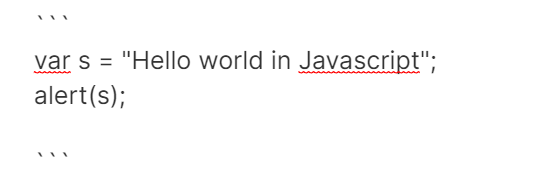
var s = "Hello world in javascript";
alert(s);
Youtube video
[](youtube video link)
[](https://www.youtube.com/watch?v=bbaYb6wt9s4)
Mark down in 15 minute youtube video
 ;
;
FOR NOW THAT IS MUCH MORE IN MARKDOWN
THANK YOU


