Right way to select the element in CSS <Selectors/>...

Selectors
Most of the beginner developers just like me ignore CSS selectors not focus much on that but CSS selectors are very important lets know more about selectors....
Types of selectors
There are 10 common ways you can select the elements in the CSS....
1.Universal :-Select any element.
example:-*{margin:0; padding:0;}
2.Type :- Select the type of selectors.
example:- h1{color:red;}
3.Grouping: We can select multiple elements different types.
example: h1,h2,h3{color:green;}
4.Class :- select multiple element that have same class name assign
example :- .className{font-size:3rem;} we can select the class with dot and class
                    name .classname.
5.id :- Want to select single elements to asssign the id we can target with the #idName.
example:-#idName{background-color: "#000"}
6.Descendant:- Element that are below to the another elements in document tree;
example:- ul li {list-style:none;} select all the li in the ul;
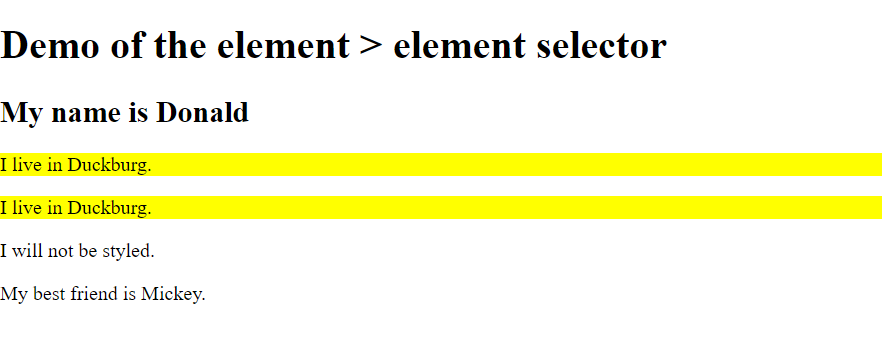
7:Child :- Element directly below to the another elements that select;
example:- div > p{background-color:yellow;} but the elements nested to another elements that elements not select like in this example p tag inside span tag that was not selected color not changed.....
<style>
div > p {
  background-color: yellow;
}
</style>
</head>
<body>

<h1>Demo of the element > element selector</h1>

<div>
  <h2>My name is Donald</h2>
  <p>I live in Duckburg.</p>
    <p>I live in Duckburg.</p>


</div>

<div>
  <span><p>I will not be styled.</p></span>
</div>

<p>My best friend is Mickey.</p>

</body>
output
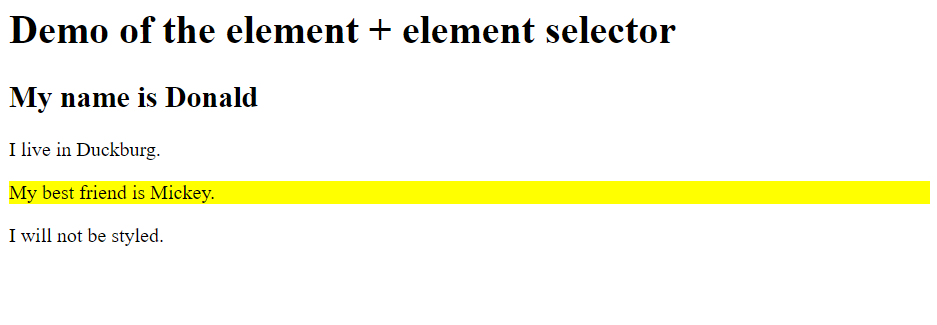
8:- Adjacent Sibling:- All the elements that are the same parents and elements are in the same sequence;
example:- div + p{background-color:yellow;}
<style>
div + p {
  background-color: yellow;
}
</style>
</head>
<body>

<h1>Demo of the element + element selector</h1>

<div>
  <h2>My name is Donald</h2>
  <p>I live in Duckburg.</p>
</div>

<p>My best friend is Mickey.</p>

<p>I will not be styled.</p>

</body>
output:
9.Genral Sibling:- All elements share the same parents and elements not immediate;
example:- div ~ p{color:red;}
10.Attribute:- Elements that match the attribute listed; example:- a[target] { background-color: yellow;} only select that elements that have attribute target..
THERE ARE MORE SELECTORS YOU CAN LEARN FORM HERE
https://www.w3schools.com/cssref/css_selectors.asp
THANK YOU
About the author
<Frontend developer/>
Comments
Join the discussionThanks for the info!


